Imagine you run a website.
People are visiting it every day. Some are coming from Google. Some are clicking your ads. Some are coming from Instagram or LinkedIn. Some read your blog and leave. Others fill out a form, buy something or contact your business.
Now imagine trying to understand all of that without any data.
You would basically be running your marketing by guessing.
Google Analytics 4, or GA4, helps you understand what people do on your website or app.
It can show you where users come from, what they interact with, which pages they visit, and which actions matter to your business.
What Is Google Analytics 4 (GA4)?
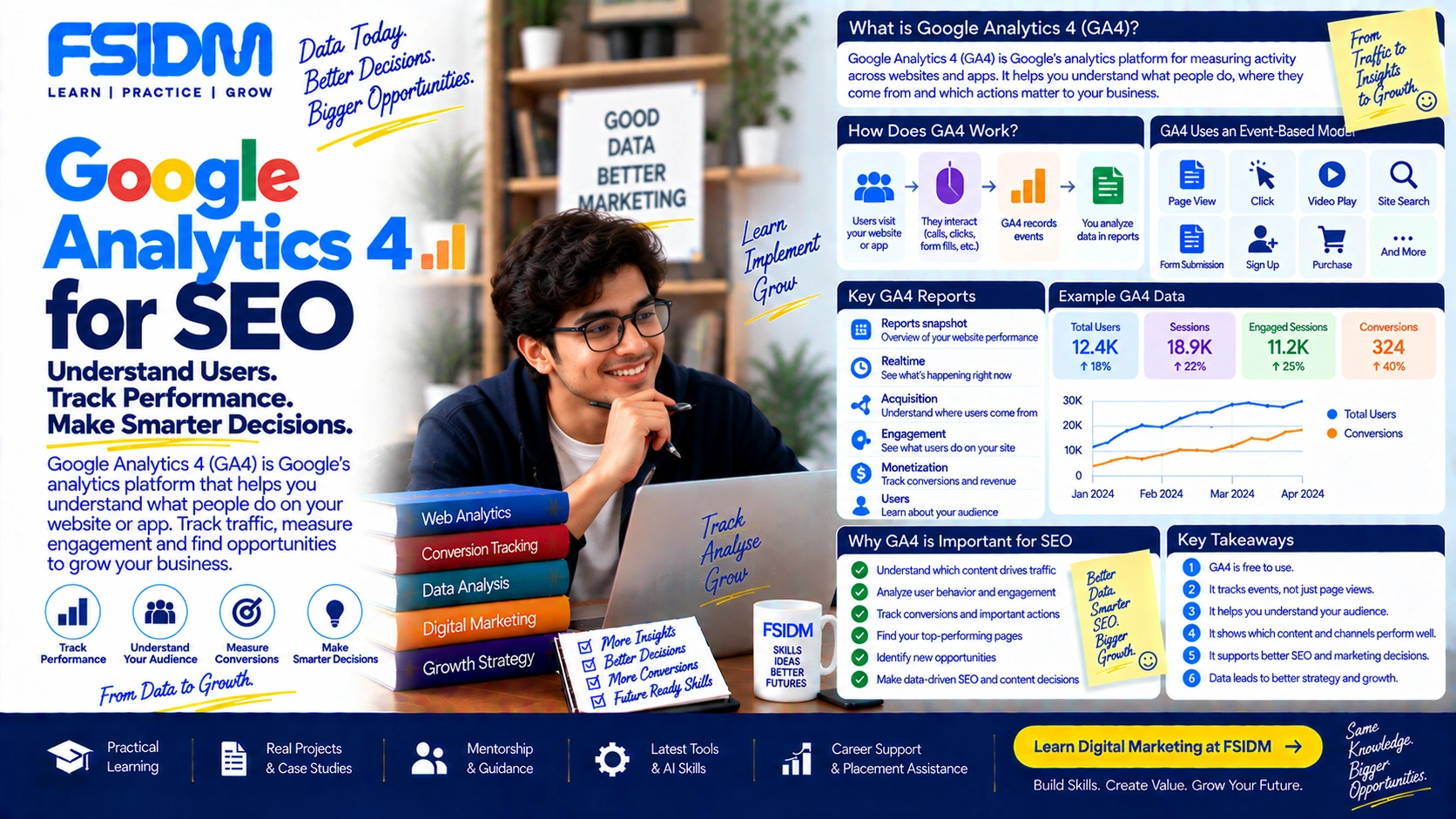
Google Analytics 4 (GA4) is Google’s analytics platform for measuring activity across websites and apps.
GA4 is the current Google Analytics property type and can be used to measure both website traffic and app usage. Google Analytics 4 became the default Google Analytics experience after October 14, 2020. :contentReference[oaicite:0]{index=0}
In simple language, GA4 helps answer questions like:
- How many people are visiting my website?
- Where are they coming from?
- Which pages are they viewing?
- What are they clicking?
- How engaged are they?
- Which marketing channels bring users?
- How many people submit a form?
- Which actions are important to my business?
So instead of simply knowing that your website received traffic, you can start understanding what happened after people arrived.
Why Was GA4 Created?
People no longer interact with businesses only through websites.
Someone might discover a brand through Instagram, visit its website from Google, return through an advertisement, use the company’s mobile app and eventually make a purchase.
GA4 was designed to measure users and their interactions across websites and apps using an event-based data model.
That is a major difference in how GA4 approaches analytics.
GA4 Uses an Event-Based Model
This is probably the most important GA4 concept to understand.
In GA4, interactions are measured as events.
An event can represent a specific interaction or occurrence on a website or app.
For example:
- A page view
- A link click
- A video play
- A search on your website
- A form submission
- A sign-up
- A purchase
Google describes an event as something that measures a specific interaction or occurrence on a website or app. :contentReference[oaicite:1]{index=1}
Think of it like this:
User enters website → user performs an action → GA4 records an event → you analyze the event in your reports.
Instead of looking at a visitor as one big block of information, GA4 lets you understand the different things that visitor does.
What Is an Event in GA4?
Suppose someone visits an FSIDM course page.
They might:
- Open the course page.
- Scroll through the content.
- Click the WhatsApp button.
- Watch a video.
- Submit an enquiry form.
These interactions can be measured as events when the appropriate tracking is configured.
Google Analytics supports automatically collected events, enhanced measurement events, recommended events and custom events. :contentReference[oaicite:2]{index=2}
Types of Events in GA4
GA4 broadly works with several types of events.
Automatically Collected Events
These are events that Analytics collects automatically when you set up Google Analytics on your website or app, depending on the implementation.
Examples include events such as first_visit and session_start.
Enhanced Measurement Events
Enhanced Measurement can automatically collect additional interactions when the feature is enabled.
This can help measure actions such as certain page views, scrolls, outbound clicks, site searches and other interactions without requiring you to manually create every event.
Recommended Events
These are events that Google recommends for particular types of interactions and use cases.
Examples include:
loginsign_upsearchgenerate_leadpurchase
Google recommends using predefined event names where they apply because they can support additional reporting and capabilities. :contentReference[oaicite:3]{index=3}
Custom Events
Sometimes your business needs to measure an interaction that does not fit an existing event.
In that situation, you can create a custom event.
For example, a business might want to measure a specific interaction with a calculator, tool or unique website feature.
What Are Users in GA4?
Another basic GA4 concept is the user.
A user represents someone who interacts with your website or app, based on Google’s measurement and reporting methods.
GA4 provides different user metrics, including:
- Total users – the total number of people who visited your website or app within the selected date range.
- Active users – users who engaged with your website or app according to Google’s criteria.
- New users – users who have not previously visited or used the property within the relevant measurement context.
- Returning users – users who have visited your website or app before.
Google notes that these metrics have specific definitions and are populated differently. :contentReference[oaicite:4]{index=4}
What Can You See in GA4?
GA4 provides reports that help you understand traffic, users, engagement and important actions.
Depending on your setup, you can analyze areas such as:
- Acquisition
- Engagement
- Users and user attributes
- Retention
- Monetization
- Technology
- Events
- Key events
Google Analytics reports are designed to help you monitor traffic, investigate data and understand users and their activity. :contentReference[oaicite:5]{index=5}
What Is Acquisition in GA4?
Acquisition helps you understand how users arrive at your website or app.
For a digital marketer, this is extremely useful.
Imagine you spent ₹20,000 on advertising across different platforms.
You want to know whether users are coming from:
- Google Search
- Google Ads
- Direct visits
- Referral websites
GA4 can help you analyze the traffic sources and channels associated with users and their activity.
This allows marketers to move beyond the question “How much traffic did we get?” and ask:
“Which channels are bringing valuable users?”
What Is Engagement in GA4?
Getting someone to visit your website is only the beginning.
The next question is:
What did they actually do?
GA4’s engagement reporting helps you understand how users interact with your website or app.
You can investigate things such as:
- Which pages users viewed
- Which events they triggered
- How long they engaged
- Which content attracted attention
- What actions happened during their visits
This can help you identify content that attracts attention and pages that may need improvement.
What Is a Key Event in GA4?
You may have previously heard marketers talk about “conversions” in Google Analytics.
In the current GA4 terminology, an important business action is measured as a key event.
A key event is an event that represents an action that is particularly important to the success of a business. :contentReference[oaicite:6]{index=6}
For example, an education business might consider these important:
- Course enquiry submitted
- Demo session booked
- Registration completed
- Phone number clicked
- WhatsApp enquiry initiated
An ecommerce business might consider:
- Add to cart
- Begin checkout
- Purchase
Any collected event can be marked as a key event when it represents an important action for the business. :contentReference[oaicite:7]{index=7}
Why Are Key Events Important?
Because traffic alone does not pay the bills.
Imagine two websites.
Website A: 100,000 visitors but very few meaningful actions.
Website B: 20,000 visitors but hundreds of qualified enquiries.
Which one is more valuable?
It depends on the business, but simply looking at visitor numbers would not give you the full answer.
GA4 lets you connect user activity with actions that matter to your business.
What Is Realtime in GA4?
The Realtime report lets you monitor activity as it happens.
You can use it to see recent user activity and verify whether Analytics is receiving data from your website or app.
Google says the Realtime report displays data shortly after interactions occur and is continuously updated. :contentReference[oaicite:8]{index=8}
This is particularly useful when you have just installed tracking or configured a new event.
You can perform the action yourself and check whether GA4 records it.
What Is DebugView in GA4?
When you are setting up or troubleshooting events, DebugView can be useful.
It allows you to inspect events triggered by a user while debugging is enabled.
For example, if you created an event for a form submission, you can test the form and check whether the event is being received correctly.
Google specifically recommends DebugView for verifying event setup and event parameters. :contentReference[oaicite:9]{index=9}
GA4 for a Digital Marketing Campaign
Let’s take a simple example.
Suppose an FSIDM campaign promotes a digital marketing course.
A person might discover the course through an Instagram ad.
They visit the website.
They read the course details.
They click the WhatsApp button.
Later, they return through Google Search and submit an enquiry.
GA4 can help you analyze the different interactions and traffic sources involved in that user’s journey, provided the appropriate tracking is configured.
Now your marketing team can ask better questions:
- Which channels bring users?
- Which landing pages receive engagement?
- Which campaigns lead to important actions?
- Which pages do users visit before submitting an enquiry?
- Where are users dropping out?
That is much more useful than simply saying, “We got 10,000 visitors.”
GA4 and Google Search Console Are Different
This is a common confusion among beginners.
Google Search Console focuses on your website’s presence and performance in Google Search.
GA4 focuses on activity and interactions on your website or app.
Think of it like this:
Search Console: “How is my website performing in Google Search?”
GA4: “What are users doing after they arrive?”
Using both can give an SEO and marketing team a much clearer picture.
GA4 and Google Ads
GA4 can also work alongside Google Ads.
When configured appropriately, marketers can use Analytics data to understand user behavior after an advertising interaction and analyze important actions associated with campaigns.
This becomes especially useful when your goal is not simply generating clicks, but generating meaningful business outcomes.
For example:
Ad click → Landing page → Engagement → Form submission → Qualified lead
GA4 can help you understand the website-side part of this journey when the necessary measurement is implemented.
GA4 for Ecommerce
For ecommerce businesses, GA4 can measure important shopping interactions through recommended ecommerce events.
These can include:
view_itemadd_to_cartbegin_checkoutpurchaserefund
Google provides recommended ecommerce events specifically for measuring online sales and shopping behavior. :contentReference[oaicite:10]{index=10}
This allows marketers to understand more than just website traffic.
They can investigate how users move through the shopping journey and where important actions happen.
GA4 for Lead Generation
Not every business sells products online.
Many businesses generate leads instead.
For example:
- Digital marketing institutes
- Real estate companies
- Consultants
- Healthcare businesses
- B2B companies
- Service businesses
For these businesses, events such as generate_lead can be useful when appropriately implemented.
Google also provides recommended lead-generation events for understanding different stages of a lead journey. :contentReference[oaicite:11]{index=11}
Does GA4 Track Everything Automatically?
No.
This is an important misconception.
GA4 automatically collects some data and events, and Enhanced Measurement can collect additional interactions when enabled.
But many business-specific actions require additional implementation.
For example, if you want to accurately measure a particular enquiry button, custom interaction or business-specific workflow, you may need to configure the appropriate event tracking.
So installing GA4 does not magically make every important business action measurable.
What Are Parameters in GA4?
An event tells GA4 what happened.
Parameters can provide additional information about that event.
For example, an event could represent a search on your website, while a parameter can contain information about the search term.
Google explains that event parameters provide additional details about user actions. :contentReference[oaicite:12]{index=12}
Think of it like this:
Event: Someone clicked a button.
Parameter: Which button did they click?
This additional context can make your reports much more useful.
What Are Audiences in GA4?
An audience is a group of users who share characteristics or behavioral patterns that you define.
For example, you could create an audience around users who:
- Visited a particular page
- Triggered a particular event
- Purchased something
- Engaged with specific content
GA4 audiences can be used for analysis, segmentation and advertising-related use cases. :contentReference[oaicite:13]{index=13}
What Are Custom Dimensions and Metrics?
GA4 provides standard dimensions and metrics, but sometimes your business needs additional information.
Custom dimensions and metrics allow you to analyze additional data collected from your website or app.
For example, a business could collect a custom property related to a user’s interaction and then configure it for reporting.
Google describes custom dimensions and metrics as a way to analyze additional custom data beyond the standard information automatically collected by Analytics. :contentReference[oaicite:14]{index=14}
GA4 Is Not Just About Counting Visitors
This is probably the biggest mindset shift for beginners.
Old-school website analytics thinking often starts with:
“How many visitors did we get?”
GA4 encourages a much broader question:
“What did users do, and which actions matter to the business?”
Ten thousand visitors sounds impressive.
But if those visitors do nothing meaningful, the number may not tell you much.
A smaller audience that reads your content, engages with your website and becomes customers can be much more valuable.
Common GA4 Mistakes Beginners Make
Looking Only at Users
User numbers are useful, but they are only one part of the story.
Always look at what users actually do.
Tracking Everything Without a Purpose
More data does not automatically mean better analysis.
Track interactions that help answer real business questions.
Ignoring Event Setup
If important actions are not configured correctly, your reports can become misleading.
Always test important events after implementation.
Confusing Traffic With Results
A traffic spike is not automatically a marketing success.
Ask whether the traffic produced meaningful engagement, leads, sales or other important outcomes.
How Should a Beginner Start With GA4?
You do not need to understand every report on your first day.
Start with a simple framework:
- Understand your users.
- Understand where they come from.
- Understand which pages they visit.
- Understand which events they trigger.
- Identify your key events.
- Connect the data to business goals.
Once these basics are clear, you can move into deeper reports, explorations, audiences and custom analysis.
Google Analytics 4 in One Simple Sentence
Google Analytics 4 helps you understand who uses your website or app, where they come from, what they do, and which actions matter to your business.
That is why GA4 is more than a visitor counter.
It is a measurement system that can help marketers connect traffic → behavior → important actions → business outcomes.
And when you combine that data with tools such as Google Search Console, Google Ads and your actual sales or lead data, you can start making marketing decisions based on evidence instead of assumptions.
Frequently Asked Questions About GA4
Is Google Analytics 4 free?
Google Analytics has a free version that provides analytics capabilities for many businesses. Google also offers a paid enterprise version called Analytics 360.
What does GA4 stand for?
GA4 stands for Google Analytics 4, Google’s current Google Analytics property type.
What is the main purpose of GA4?
The main purpose of GA4 is to measure and analyze user activity across websites and apps so businesses can understand traffic, engagement and important actions.
What is an event in GA4?
An event is a measurement of a specific interaction or occurrence on a website or app, such as a page view, click, search, sign-up or purchase.
What is a key event in GA4?
A key event is an event that represents an action that is particularly important to the success of a business.
Is GA4 the same as Google Search Console?
No. Search Console focuses on your website’s performance and presence in Google Search, while GA4 focuses on user activity and interactions across your website or app.
Can GA4 track conversions?
GA4 can measure important business actions by collecting events and identifying relevant events as key events.
Can GA4 track ecommerce purchases?
Yes. GA4 supports recommended ecommerce events such as add_to_cart, begin_checkout and purchase when they are implemented correctly.