Imagine you are planning your next blog, SEO campaign or social media content.
You have five topics in mind. But there is one problem: which topic are people actually interested in right now?
You could guess.
Or you could look at what people are searching for.
That is where Google Trends becomes useful.
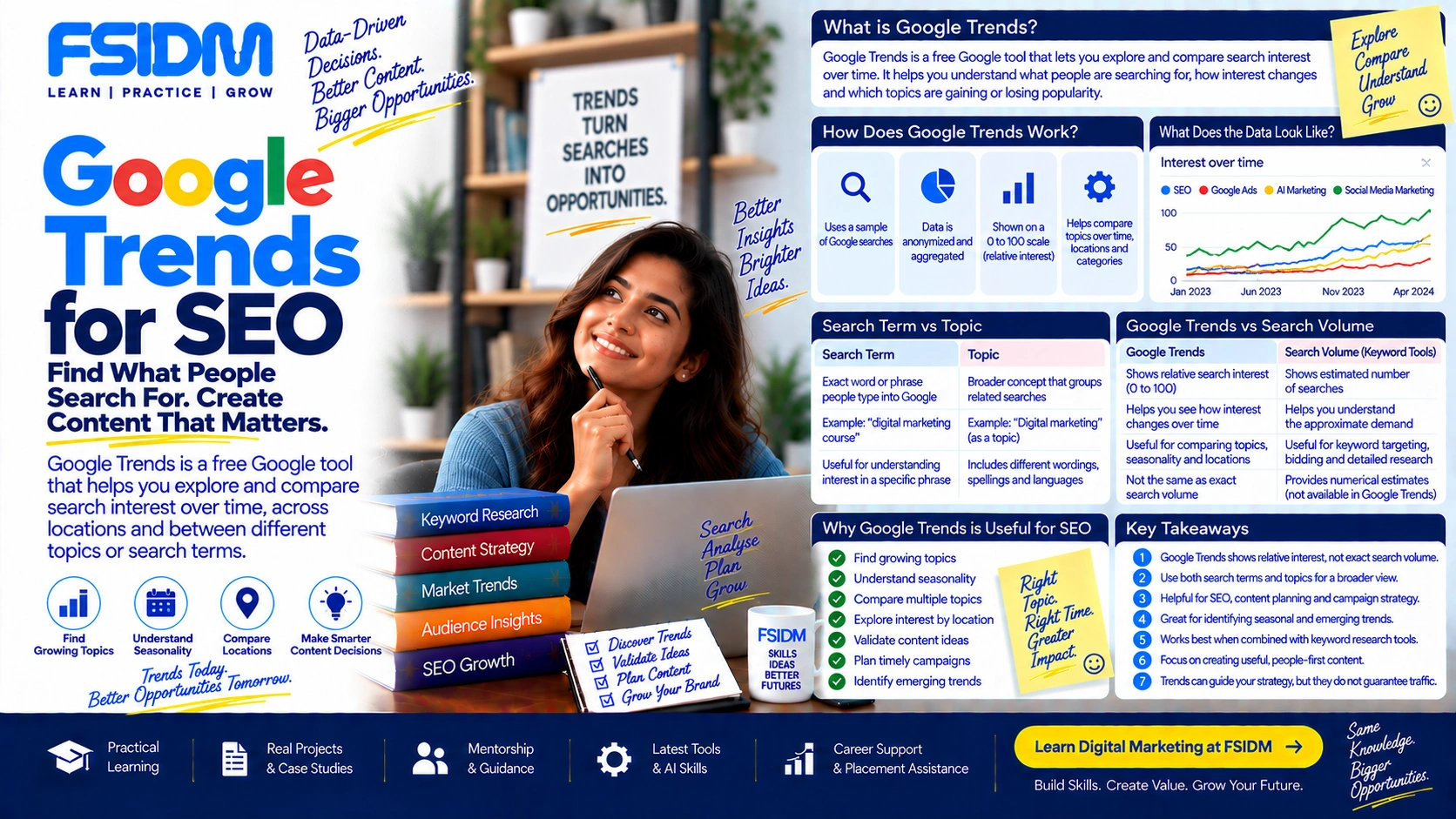
Google Trends helps you understand how interest in search topics changes over time, across locations and between different topics or search terms.
What Is Google Trends?
Google Trends is a free Google tool that lets you explore and compare search interest on Google over time.
It can help you see whether interest in a topic is increasing, decreasing, seasonal or suddenly spiking.
For example, imagine you are researching digital marketing topics. You could compare searches around:
- SEO
- Google Ads
- Social Media Marketing
- AI Marketing
Instead of looking at these topics as static keywords, Google Trends lets you see how search interest changes.
That makes it useful for marketers, SEO professionals, content creators, business owners, journalists and researchers.
How Does Google Trends Work?
This is where Google Trends can be a little confusing.
Google Trends does not simply show you the total number of searches for a keyword.
Google says Trends uses a sample of actual Google searches. The data is anonymized, categorized and aggregated, and then normalized so that search interest can be compared across time and locations.
The results are represented on a scale from 0 to 100. :contentReference[oaicite:0]{index=0}
So when you see a value of 100, it does not mean that 100 people searched for the keyword.
It means that the search term or topic reached its highest relative popularity within the selected data set.
What Does 0 to 100 Mean in Google Trends?
The 0–100 scale represents relative search interest.
- 100 means the highest relative search interest in the selected period and location.
- 50 represents roughly half of the relative popularity of the peak.
- 0 can mean very low search interest or insufficient data.
For example, suppose you search for “digital marketing course” and the graph reaches 100 in January.
That does not mean there were exactly 100 searches in January.
It means January was the highest point of relative search interest for that query within the selected comparison.
Think of Google Trends more like a trend meter than a search-volume counter.
Is Google Trends the Same as Search Volume?
No.
This is one of the most important things to understand.
Google Trends shows relative interest. It does not give you exact monthly search volume for a keyword.
Suppose one keyword has a Trends score of 80 and another has a score of 40.
You cannot simply say, “The first keyword gets 80,000 searches and the second gets 40,000 searches.”
That is not how the data works.
If you need estimated search-volume data, you need a keyword research or advertising platform designed to provide those estimates.
Google Trends answers a different question:
“How is people’s search interest changing?”
Google Trends Search Term vs Topic
When using Google Trends, you may notice that Google gives you the option to explore a search term or a topic.
They are not exactly the same.
What Is a Search Term?
A search term represents the exact word or phrase people type into Google.
For example, if you search for “digital marketing course,” Google Trends can show interest around that specific wording.
This is useful when you want to understand how people use a particular phrase.
What Is a Topic?
A topic represents a broader concept or real-world entity and can group related searches, including different wording, spellings and languages.
Google explains that topics are grouped using its understanding of related searches and entities. :contentReference[oaicite:1]{index=1}
This can be useful when you want to understand interest in the broader concept rather than one exact phrase.
Why Is Google Trends Useful for SEO?
Traditional keyword research often gives you numbers such as search volume, keyword difficulty or CPC.
Those numbers are useful.
But there is another question marketers need to ask:
Is interest in this topic actually growing?
Google Trends can help you investigate that.
1. Find Growing Topics
Imagine you run a digital marketing blog.
You have two possible topics:
- A topic people have searched for consistently for years.
- A newer topic whose search interest is increasing quickly.
Both might be worth covering, but they represent different opportunities.
Google Trends can help you spot changes in interest before making your content decision.
2. Understand Seasonality
Not every keyword behaves the same way throughout the year.
Some searches naturally increase during particular seasons, events or occasions.
For example:
- “Diwali gifts” can become more relevant before Diwali.
- “AC repair” can become more relevant during hotter months.
- “Cricket” searches can spike around major matches and tournaments.
- “Admission” searches can change around education cycles.
If you understand these patterns, you can plan your content before the demand reaches its peak.
3. Compare Different Topics
Suppose you are deciding whether to create more content around SEO, Google Ads or social media marketing.
You can compare their search interest in Google Trends.
This does not automatically tell you which topic will generate the most customers.
But it gives you another useful piece of evidence for your decision.
4. Understand Regional Interest
Search interest can also vary from one location to another.
Google Trends lets you explore interest by country, region and, in some cases, city or metro area.
For local marketers, this can be particularly useful.
For example, a topic may show stronger relative interest in one Indian state than another.
However, remember that regional Trends data is also relative. A region showing higher interest does not necessarily mean it has the highest absolute number of searches. :contentReference[oaicite:2]{index=2}
5. Discover Related Searches
Google Trends also provides related searches around the topic you are researching.
These can help you discover additional subjects and queries that people are searching for in connection with your main topic.
Google separates these into areas such as Top and Rising searches.
Rising searches show queries experiencing significant growth compared with the previous period. When Google displays “Breakout,” it means the growth is greater than 5,000%. :contentReference[oaicite:3]{index=3}
What Are Rising Searches in Google Trends?
Rising searches are search queries that have experienced significant growth during the selected period.
For a content marketer, this can be interesting because rising searches can reveal subjects that are gaining attention.
For example, imagine you are researching AI marketing.
You might start with a broad topic and then discover related searches that are growing much faster than the main topic.
Those rising searches can become potential ideas for:
- Blog articles
- Videos
- Social media posts
- Newsletters
- Landing pages
- Campaigns
What Is a Breakout Search?
A Breakout search is a search query that has grown by more than 5,000% compared with the previous period used by Google Trends.
That sounds huge because it is.
But it is important not to immediately assume that every breakout topic will become a long-term trend.
A sudden news event, celebrity moment, sports match or viral story can create a massive temporary spike.
So always investigate why the search is increasing.
How to Use Google Trends for Keyword Research
Here is a simple workflow you can follow.
- Start with a topic. Enter the subject you are researching.
- Choose the right search term or topic. Make sure you understand what Google is actually measuring.
- Select the location. Choose worldwide, India or a more specific region depending on your objective.
- Select a time period. Look at recent interest or a longer period to understand the bigger pattern.
- Check the trend line. Look for growth, decline, spikes and recurring patterns.
- Compare topics. Add other relevant topics or terms.
- Check regional interest. See where the topic has stronger relative interest.
- Explore related and rising searches. Look for additional content ideas.
- Validate your findings. Combine Trends with search-volume data, competition, CPC, audience research and actual business demand.
The last step is important.
Do not build an entire SEO strategy from Google Trends alone.
A Simple Digital Marketing Example
Let’s say you are planning content for a digital marketing institute in India.
You are considering these topics:
- SEO course
- Digital marketing course
- AI marketing course
- Performance marketing course
You could put all four topics into Google Trends and compare their relative search interest.
Then you could look at how that interest changes over time.
Maybe one topic is consistently searched.
Maybe another has recently started growing.
Maybe one shows strong seasonality.
Now your content decision is based on more than a random guess.
You can combine that information with keyword volume, competition, CPC, search intent, audience needs and your actual course offerings.
That is where Google Trends becomes powerful.
Google Trends for Content Strategy
Google Trends can help you answer questions such as:
- What topics are gaining attention?
- Is this topic seasonal?
- When does interest usually peak?
- Which related topics are people searching for?
- Where does this topic have stronger relative interest?
- How does one topic compare with another?
These insights can influence your content calendar.
For example, if you know that interest in a subject usually rises every November, waiting until November to publish your article may be too late.
You may want the content published earlier so that it has time to become visible before the peak arrives.
Google Trends for Local SEO
Local businesses can also use Google Trends as part of their research.
Imagine a business targeting customers in Gujarat.
You could investigate whether a particular service or topic shows stronger relative interest in Gujarat compared with other regions.
You could also compare different topics to understand which ones appear more relevant to the market you are targeting.
But again, Trends should be treated as one research signal, not a complete local SEO report.
Google Trends vs Keyword Planner
Google Trends and Google’s keyword-planning tools can both be useful, but they answer different questions.
| Google Trends | Keyword Planner |
|---|---|
| Shows relative search interest | Provides keyword and advertising-related estimates |
| Useful for trends and seasonality | Useful for search-volume and paid-search planning |
| Useful for comparing topics | Useful for keyword discovery and planning |
| Useful for identifying rising interest | Useful for evaluating advertising opportunities |
In practice, marketers can use both tools together rather than expecting one tool to answer every keyword-research question.
What Google Trends Cannot Tell You
Google Trends is useful, but it is not a crystal ball.
It does not directly tell you:
- The exact monthly search volume of a keyword
- How difficult it will be to rank organically
- How much money a keyword can generate
- Whether searchers will become customers
- Whether your competitors have better content
- Whether a trend will continue permanently
Google itself also warns that Trends should not be treated as polling data or as a perfect mirror of search activity. It is one data point that should be considered alongside other information. :contentReference[oaicite:4]{index=4}
Can Google Trends Predict the Future?
Not exactly.
Google Trends can show patterns, changes and historical behavior, but that does not mean it can guarantee what people will search for tomorrow.
A sudden spike might represent a lasting change.
Or it might simply be today’s big news.
That is why you should always ask:
“Why is this trend happening?”
Then check whether the interest continues over a longer period.
One Important Limitation for AI Search
Modern SEO is increasingly connected with AI search experiences, so there is an important detail to know.
Google states that searches made by Google products and services, including AI Mode and AI Overviews, are excluded from Google Trends data. :contentReference[oaicite:5]{index=5}
So Google Trends should not be interpreted as a complete measurement of how people interact with Google’s AI search experiences.
For AI SEO research, you need to combine Trends with other sources and real search behavior.
Is Google Trends Useful for Beginners?
Yes.
You do not need to be an SEO expert to start using it.
Begin with one simple question:
“Are people becoming more interested in this topic?”
Then learn to compare topics, study seasonality, explore regions and investigate related searches.
Once you understand these basics, Google Trends becomes much more useful for content and keyword research.
Frequently Asked Questions About Google Trends
Is Google Trends free?
Yes. Google Trends is a free Google service.
Does Google Trends show exact search volume?
No. Google Trends shows normalized relative search interest rather than exact search volume.
What does 100 mean in Google Trends?
100 represents the highest relative search interest for the selected search, location and time period.
What does 0 mean in Google Trends?
A value of 0 can indicate very low search interest or insufficient data.
Can Google Trends be used for SEO?
Yes. It can be used for topic research, keyword exploration, seasonality, regional research, comparisons and identifying rising searches.
What is a Breakout search in Google Trends?
Google uses “Breakout” when a search query has grown by more than 5,000% compared with the previous period.
Can Google Trends replace keyword research tools?
No. Google Trends provides a different type of insight. It works best when combined with search-volume data, competition analysis, search intent and other keyword research methods.
Google Trends in One Simple Sentence
Google Trends helps you understand how people’s search interest changes over time, across locations and between topics.
And that is the real value of the tool.
Instead of asking only, “What are people searching for?”, you can ask a better question:
“What are people becoming interested in?”
That small shift can help you make smarter decisions about SEO, content, campaigns and digital marketing.