Crawling is the initial process where search engine bots discover new and updated webpages across the internet.
Search engines use automated software called crawlers, spiders, or bots to visit webpages, read their content and links, and discover additional URLs. Google’s crawler is known as Googlebot.
Crawling is the first stage of Google Search. Before a webpage can be processed for indexing and potentially appear in search results, Google needs to discover and access it.
How Does Crawling Work?
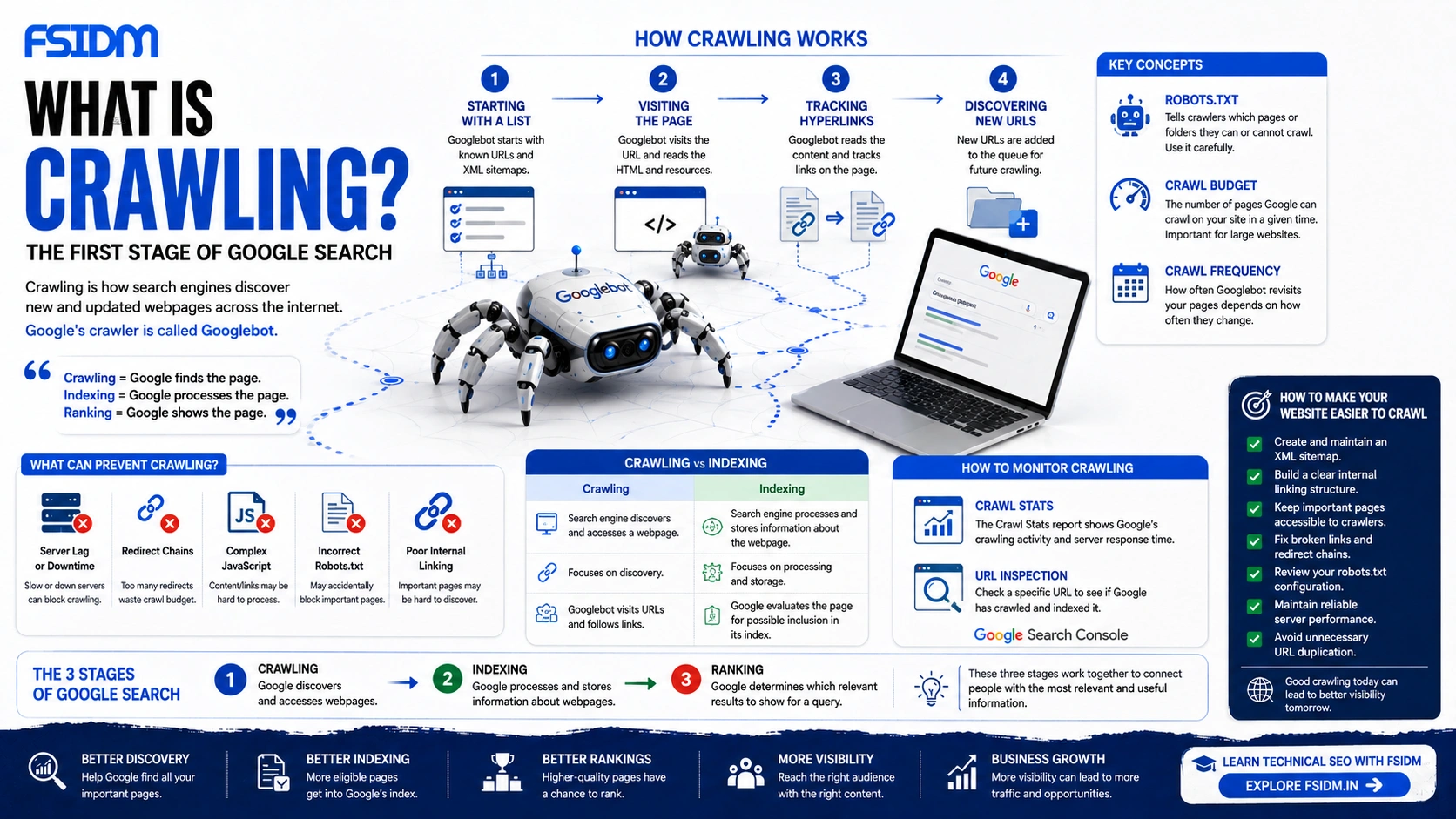
Crawling is a continuous process driven by known URLs, XML sitemaps, and hyperlinks.
Known URLs & Sitemaps → Googlebot Visits URL → Reads HTML & Code → Follows Links → Discovers New URLs
1. Starting With a List
Googlebot begins with URLs that Google already knows about. Websites can also provide an XML sitemap containing important URLs they want search engines to discover.
2. Visiting the Page
Googlebot requests the webpage and processes the resources needed to understand it, including its HTML and other relevant files.
3. Tracking Hyperlinks
As Googlebot processes a webpage, it can discover hyperlinks pointing to other webpages. These links provide additional paths for discovering content.
4. Discovering New URLs
Newly discovered URLs can become candidates for future crawling. This continuous process helps search engines build and update their map of the web.
Key Concepts Related to Crawling
Robots.txt
Robots.txt is a file that provides instructions to search engine crawlers about which URL paths they should or should not crawl.
It can be used to prevent crawlers from accessing areas that do not need to be crawled. However, incorrect rules can accidentally block important pages.
Crawl Budget
Crawl budget refers to the amount of crawling Google can perform on a website within a given period. It becomes especially relevant for large websites with many URLs.
Crawl Frequency
Crawl frequency refers to how often a search engine crawler revisits a URL to look for changes or updates. Frequently changing websites may be crawled more often than pages that rarely change.
What Can Prevent Search Engines From Crawling a Website?
- Server lag or downtime: Slow or unavailable servers can interfere with crawling.
- Redirect chains: Multiple redirects can create unnecessary crawling paths.
- Complex JavaScript: Poorly implemented JavaScript can make content or links harder to process.
- Incorrect robots.txt rules: Important pages may accidentally be blocked.
- Poor internal linking: Important pages may be difficult for crawlers to discover.
Crawling vs Indexing
| Crawling | Indexing |
|---|---|
| Search engine discovers and accesses a webpage. | Search engine processes and stores information about the webpage. |
| Focuses on discovery. | Focuses on processing and storage. |
| Googlebot visits URLs and follows links. | Google evaluates the page for possible inclusion in its index. |
Easy way to remember: Crawling = Google finds the page. Indexing = Google processes and stores the page.
Crawling, Indexing and Ranking
These three stages work together:
- Crawling: Google discovers and accesses webpages.
- Indexing: Google processes and stores information about webpages.
- Ranking: Google determines which relevant results to show for a user’s query.
How to Monitor Crawling
You can monitor Google’s crawling activity using Google Search Console.
Crawl Stats
The Crawl Stats report provides information about Google’s crawling activity and server response performance.
URL Inspection
The URL Inspection tool lets you check Google’s information about a specific URL, including whether Google has crawled and indexed it.
How to Make Your Website Easier to Crawl
- Create and maintain an accurate XML sitemap.
- Build a clear internal linking structure.
- Keep important pages accessible to search engine crawlers.
- Fix broken links and unnecessary redirect chains.
- Review your robots.txt configuration.
- Maintain reliable server performance.
- Avoid unnecessary URL duplication.
Frequently Asked Questions About Crawling
What is crawling in SEO?
Crawling is the process where search engine bots discover and access webpages so the search engine can process their content.
What is a crawler?
A crawler is automated software used by a search engine to discover and fetch webpages. Google’s crawler is called Googlebot.
Does crawling mean my page is indexed?
No. Crawling and indexing are different processes. Google can crawl a page without necessarily including it in its search index.
How can I check if Google crawled my page?
You can use the URL Inspection tool in Google Search Console to check Google’s information about a specific URL.
Can robots.txt stop Google from crawling a page?
Yes. A robots.txt rule can prevent Googlebot from crawling a URL or path, so it should be configured carefully.
Interview Question: What Is Crawling?
Answer: Crawling is the process in which search engine bots such as Googlebot discover and access webpages across the internet using known URLs, sitemaps, and links. It is the first stage before indexing and ranking.
Interview Tip
“Crawling is how Google discovers your pages. If Google cannot crawl a page, it cannot properly process that page for search.”
Learn Technical SEO With FSIDM
Understanding crawling is one of the foundations of Technical SEO. Once you understand how search engines discover webpages, you can better understand indexing, ranking, XML sitemaps, robots.txt, internal linking, and technical SEO.
At FSIDM, you can learn SEO and digital marketing through a practical, industry-focused approach.
Learn SEO. Understand how search works. Build better websites.
Sources
Google Search documentation and the sources referenced in this article.