

🧠 What Is Google Antigravity? #
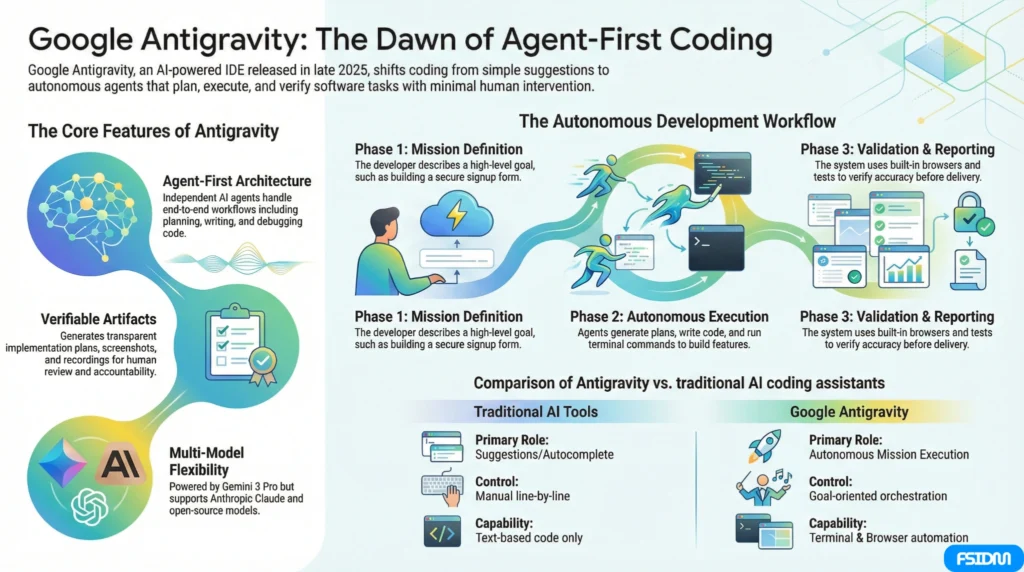
Google Antigravity is an AI-powered integrated development environment (IDE) from Google, designed to usher in the agent-first era of software creation. Released in public preview on November 18, 2025, it moves beyond simple autocomplete and suggestion tools to allow autonomous AI agents to plan, write, test, and document code with minimal human oversight.
Instead of typing every line manually, developers describe goals to the system and let AI agents take care of end-to-end workflows — from designing features to verifying output.
🚀 Why Antigravity Is a Paradigm Shift #
Unlike traditional IDEs that assist with incremental suggestions, Antigravity is centered around autonomous agents that can:
✔ Plan and execute complex tasks
✔ Write and test code across multiple files
✔ Run terminal commands and browser interactions
✔ Produce verifiable Artifacts (task lists, plans, screenshots, recordings)
✔ Operate in parallel and learn from prior work
It uses cutting-edge AI models including Google’s Gemini 3 Pro, and is designed to make software development faster, more strategic, and more intuitive.
🧩 Key Features #
📌 1. Agent-First Architecture #
Antigravity lets you spawn and manage multiple AI agents that work independently on tasks — planning, writing, debugging, and validating without constant manual prompts.
🛠 2. Integrated IDE Experience #
It offers a familiar editor (similar to Visual Studio Code) but with AI agents deeply embedded, giving you the power of traditional IDEs plus automated workflow execution.
📋 3. Artifacts for Transparency #
Instead of raw logs, Antigravity produces Artifacts like implementation plans, task lists, screenshots, and browser recordings you can review and comment on — ensuring clarity and accountability.
🧠 4. Terminal & Browser Automation #
Agents can run terminal commands (e.g., building or testing your code) and interact with a built-in browser to validate UI and functionality — essentially giving AI full control over development workflows.
🤝 5. Model Flexibility #
While powered by Gemini 3 models, Antigravity also supports other advanced AI models such as Anthropic’s Claude series and open-source variants — giving developers more options and flexibility.
💡 How Antigravity Works — A Simple Example #
Here’s a high-level workflow of what Antigravity can do:
- Define the Task: You describe what you want — like “build a signup form with secure authentication”.
- Agent Planning: An AI agent generates an implementation plan.
- Execution: The agent writes code, runs builds, and tests features.
- Verification: It uses the browser or integrated tests to confirm accuracy.
- Artifacts: It outputs reports, logs, visual captures, and more to illustrate what it did.
This level of automation turns developers into architects and overseers, not just hands-on coders.
⚖️ Benefits for Developers & Teams #
🌟 Speed & Productivity #
Routine coding tasks and repetitive workflows can be automated, letting teams focus on strategic design and innovation.
🧠 Improved Collaboration #
Teams can review Artifacts generated by agents, making it easier to collaborate on idea refinement and quality assurance.
🚀 Modern Development Workflows #
Antigravity encourages a new way of writing software — one where a developer orchestrates AI tasks instead of micromanaging every line of code.
⚠️ Important Security & Risk Considerations #
Antigravity’s autonomy comes with security challenges:
🔒 Autonomous Command Execution Risks
Security researchers found that AI agents in Antigravity can execute terminal commands without strict safeguards, potentially exposing sensitive data or configurations.
🔒 Potential Vulnerabilities
Experts flagged the platform for possible backdoor attacks via compromised workspaces — highlighting the need for careful code governance.
📌 Best Practice: Always review agent output artifacts and limit privileges for AI agents when working on sensitive or production systems.
📥 Installation & Setup — Quick Overview #
Antigravity is currently available for:
✔ Windows (64-bit)
✔ macOS (Monterey or later)
✔ Linux distributions (glibc required)
While public preview currently offers free access, usage may be subject to rate limits depending on workload and subscription tier.
To get started, you typically:
- Download the installer from antigravity.google
- Sign in with a personal or organizational Google account
- Launch the agent manager and begin new development missions
📌 FAQ — Google Antigravity #
Q. Is Antigravity free to use?
Yes — during its public preview phase, Google Antigravity is free with generous usage limits.
Q. How is Antigravity different from GitHub Copilot or Cursor?
Traditional tools assist with suggestions and completions. Antigravity uses autonomous AI agents that execute full tasks and produce verifiable artifacts.
Q. Can AI agents break/build my system?
Yes — because agents have terminal and browser access, they can execute real commands. Always supervise agent workflows and restrict high-risk operations.
Q. What languages does Antigravity support?
It supports all major programming languages, including Python, JavaScript, TypeScript, Java, C++, Go, Rust, and more.
Q. Can I use my own AI models?
Alongside Gemini 3, Antigravity supports other advanced models like Claude Sonnet and open-source variants where available.
🧾 Final Thoughts #
Google Antigravity isn’t just another code suggestion tool — it’s a shift in how we think about AI in software development.
With autonomous agents, mission-level planning, and artifact-based transparency, it redefines what a modern IDE can do. While powerful, responsible use, monitoring, and security best practices are essential to harness its full potential.