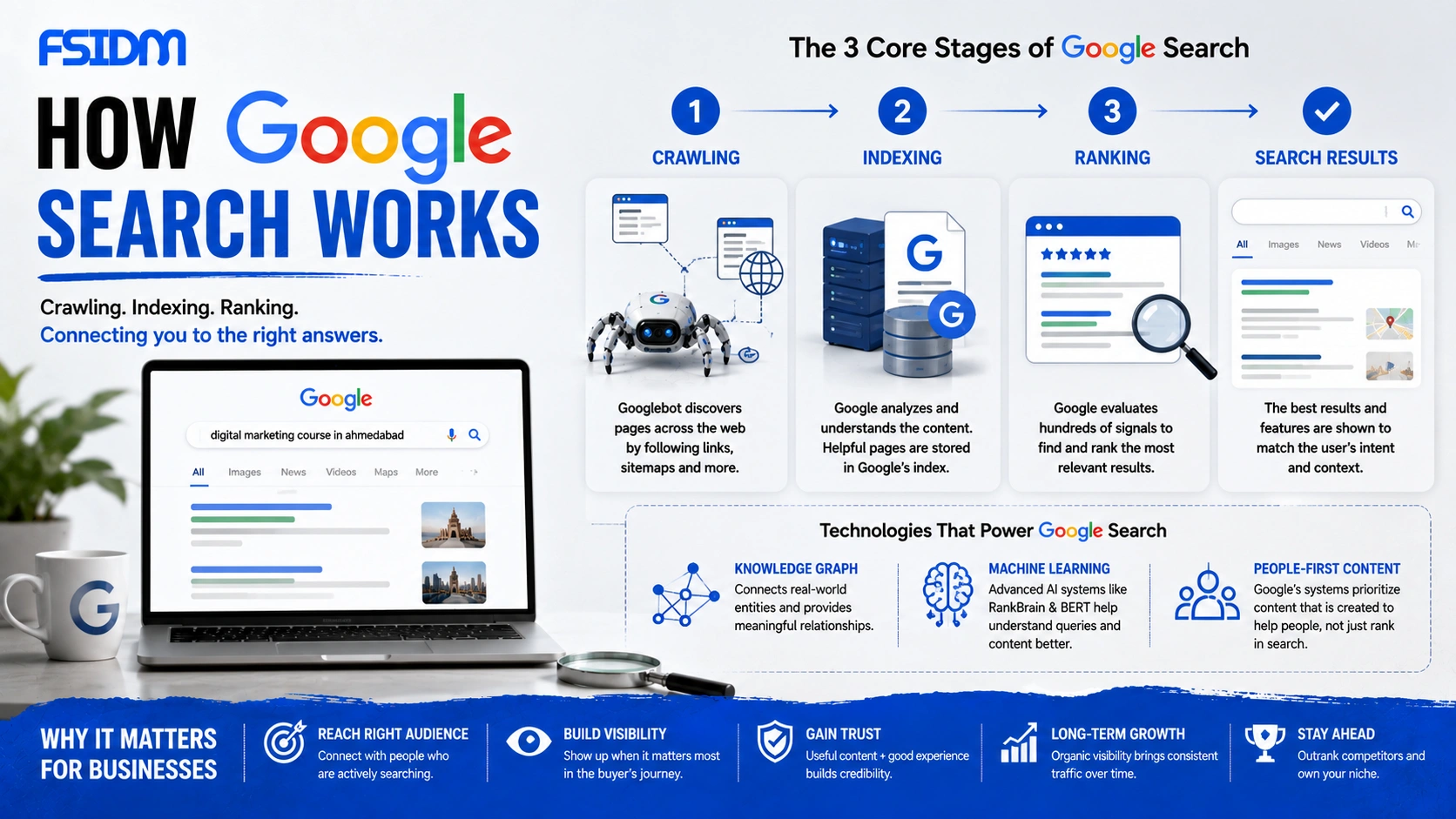
Google Search works by discovering webpages, organizing their information, and then selecting the most relevant results for a user’s search query.
Google does not scan the entire live internet every time someone searches. Instead, it relies on a massive, continuously updated index of webpages. The process can be simplified into three major stages: Crawling → Indexing → Ranking.
How Does Google Search Work?
1. Crawling: How Google Discovers Websites
Crawling is the process through which Google’s automated systems discover webpages across the internet.
Google uses automated software called Googlebot to visit webpages and discover new or updated URLs. Google can discover URLs through links, sitemaps, and other known sources.
When Googlebot visits a webpage, it can follow links found on that page to discover additional webpages. This allows Google’s systems to continuously discover new and updated content.
Example of Crawling
Imagine Googlebot discovers an SEO article on Website A. That article contains a link to another article on Website B. Googlebot can follow that link and discover Website B’s page.
This is one reason internal linking and a clear website structure are important for SEO.
2. Indexing: How Google Understands and Stores Pages
After discovering a webpage, Google’s systems process and analyze its content.
Google can examine information such as:
- Text and page content
- Images and other media
- Links
- Page structure
- Technical information
- Structured data and other metadata
Google then decides whether the page is eligible to be stored in its Search Index. If a webpage is not indexed, it generally cannot appear in Google’s organic search results.
Why Indexing Matters
Creating a webpage does not automatically guarantee that it will appear in Google Search. Google must first discover and process the page, and the page must be eligible for indexing.
3. Ranking: How Google Chooses Search Results
When a user enters a search query, Google searches its index and uses automated ranking systems to determine which results are most relevant and useful.
Google considers many signals and aspects of the query and webpage, including:
- Search intent: What the user is actually trying to find.
- Relevance: How closely the content matches the query.
- Content quality: Whether the page provides useful information.
- Context: Factors such as language and location.
- Website and page signals: Information that helps Google’s systems evaluate the page.
The result is a ranked set of webpages and search features designed to satisfy the user’s query.
Google Search Process in Simple Terms
| Stage | What Happens | Simple Example |
|---|---|---|
| Crawling | Google discovers webpages and URLs. | Googlebot finds a new blog post through a link. |
| Indexing | Google processes and stores information about the page. | Google understands that the page is about SEO. |
| Ranking | Google evaluates indexed pages for a user’s query. | The most relevant pages are selected for the results. |
What Technologies Help Google Understand Search Queries?
Google uses sophisticated systems to understand both webpages and the meaning behind search queries.
Knowledge Graph
Google’s Knowledge Graph helps connect real-world entities such as people, places, organizations, and concepts. This supports Google’s ability to understand relationships between different pieces of information.
Machine Learning Systems
Google uses machine learning systems to better understand language, context, relevance, and user queries. Systems such as RankBrain and BERT have played important roles in improving Google’s understanding of language.
People-First Content
Google’s systems are designed to surface useful content created primarily to help people rather than content created solely to manipulate search rankings.
What Does Google Show in Search Results?
Google does not always show the same type of result for every query. Depending on the search intent, users may see different search features.
- Organic search results
- Local results and maps
- Featured snippets
- Images and videos
- News results
- Shopping results
- AI-powered search features
Google chooses the search experience that it believes best matches the user’s query and intent.
How Can You See How Google Interacts With Your Website?
Website owners can use several tools to understand how Google discovers and indexes their webpages.
Use the Site Search Operator
You can search Google using:
site:yourdomain.com
This can help you find webpages from your domain that appear in Google’s search index.
Use Google Search Console
Google Search Console provides more detailed information about your website’s visibility and indexing.
The URL Inspection tool can help you understand Google’s indexing status for an individual URL, while other reports provide information about crawling and search performance.
Why Understanding Google Search Matters for SEO
SEO becomes much easier to understand when you know what happens behind the search results.
Your job as an SEO professional is not simply to add keywords to a page. You need to make sure Google can:
- Discover your pages.
- Understand your content.
- Index eligible pages.
- Recognize their relevance to search queries.
- Evaluate the overall quality and usefulness of the content.
In simple terms, SEO helps search engines discover, understand, and evaluate your website so that your content has an opportunity to appear when people search for relevant information.
Frequently Asked Questions About Google Search
How does Google Search work?
Google Search works through three major stages: crawling, indexing, and ranking. Google discovers webpages, processes and stores their information, and then ranks relevant indexed pages for user queries.
What is Googlebot?
Googlebot is the name commonly used for Google’s web crawler. It helps Google discover new and updated webpages across the internet.
What is crawling in Google?
Crawling is the process of discovering webpages and URLs using automated systems such as Googlebot.
What is indexing in Google?
Indexing is the process of analyzing and storing information discovered from webpages so that Google can potentially retrieve those pages for relevant searches.
What is ranking in Google?
Ranking is the process of determining the order of eligible search results for a particular query based on Google’s automated ranking systems.
How can I check if Google has indexed my website?
You can use Google’s site: search operator for a quick check or use Google Search Console for more detailed indexing information.
Interview Question: How Does Google Search Work?
Answer: Google Search primarily works through three stages: crawling, indexing, and ranking. Googlebot discovers webpages, Google’s systems process and store their information in the Search Index, and ranking systems then select and order relevant results when a user searches.
Interview Tip
“Think of Google like a library: crawling finds the books, indexing organizes them, and ranking decides which books to show you first.”
Learn SEO With FSIDM
Understanding how Google Search works is one of the most important foundations of SEO. Once you understand crawling, indexing, and ranking, you can better understand technical SEO, content optimization, internal linking, and search visibility.
Don’t just learn how to rank. Understand how Google finds and evaluates your website.
Explore FSIDM at fsidm.in.